

A phone line and a call center are not the same thing, even though it’s easy to treat them that way when your business is small. A basic phone line does one primary job: it connects a caller to someone on your team. That can be enough when you receive a manageable number of calls and most customers only need to speak with one person.
But as call volume grows, customers expect faster responses, more employees become involved, and your business starts serving customers across different languages or time zones, a single phone line can quickly become a limitation. To evaluate whether your current setup is holding back growth, explore our guide on 5 signs your business needs a cloud call center not just a phone line.
A cloud call center does much more than connect calls. It can route callers to the right department, queue calls during busy periods, record conversations, provide call analytics, support multiple numbers, connect with business software, and allow teams to handle calls from different locations. The important question isn’t whether your business is “big enough” for a call center. It’s whether your current phone setup is making it harder to handle the calls you’re already receiving.
Here are five signs that your business may have quietly outgrown a traditional phone line.
Sign 1: You’re Missing Calls During Peak Hours
One of the clearest signs is also one of the easiest to overlook. Your team is already handling a customer when another person calls. The second caller gets a busy signal, waits without knowing what is happening, or simply hangs up after nobody answers.
If this happens regularly, those missed calls can represent missed sales, missed appointments, unanswered support requests, or customers who simply decide to try another business. The problem becomes especially noticeable during predictable busy periods.
For example, a business might receive relatively few calls during the morning but experience a large spike around lunchtime or after working hours. With a single phone line, the infrastructure itself creates a limit on how many conversations can happen simultaneously.
A cloud call center approaches the problem differently. Instead of treating every incoming call as a direct connection between one caller and one employee, the system can place callers into a queue and distribute calls across available agents. Depending on how the system is configured, calls can be:
-
Routed to the next available agent
-
Distributed between different departments
-
Sent to another number when the primary team is busy
-
Placed into a waiting queue
-
Sent to voicemail with a callback option
-
Routed to an AI voice agent for common requests
-
Forwarded to an after-hours support team
This means a busy employee doesn’t necessarily mean a missed customer.
Why Call Queuing Matters
Call queuing also gives customers a more predictable experience. Instead of repeatedly calling a number and hoping someone answers, the caller can receive a message explaining that their call is being held and, depending on the setup, potentially receive an estimated position or callback option. For a growing business, this small change can make a significant difference because it separates call volume from the number of people available at one exact moment.
Sign 2: Your Team Can’t Handle Multiple Languages
Another sign that your phone setup has reached its limits is when your customer base becomes more multilingual than your team. A business may start by serving primarily Arabic-speaking customers and later begin receiving more calls in English. As the business grows, customers may also contact the company in French, German, or another language.
If only one or two employees can comfortably handle those conversations, your business has a coverage problem. That doesn’t necessarily mean you need to hire a separate full-time employee for every language.
A cloud call center can combine different forms of language support depending on the type and volume of calls. For example, multilingual calls can be handled through:
-
Multilingual customer service agents
-
Language-based call routing
-
IVR menus in multiple languages
-
Multilingual AI voice agents
-
Language detection and routing
-
Human handoff when an AI system needs additional support
This can be particularly useful for businesses serving customers across different regions.
Multilingual AI Voice Agents
AI voice agents can extend language coverage without requiring a separate agent for every language. For routine conversations, an AI voice agent can answer questions, collect customer information, qualify leads, schedule appointments, provide basic information, and route callers to the appropriate team.
The important distinction is that AI doesn’t have to replace your existing staff. It can act as another layer of the call center. A customer might begin a call with an AI voice agent, provide their details and reason for calling, and then be transferred to a human agent when the request requires personal assistance. For businesses receiving calls in Arabic and English, for example, this can create a more consistent experience without forcing every employee to be fluent in both languages.
Sign 3: You Have No Visibility Into Your Call Data
A basic phone line can tell you that a call came in. It usually doesn’t tell you much about what happened across your entire operation. You may not know:
-
How many calls you receive each day
-
Which hours have the highest call volume
-
How many calls go unanswered
-
How long customers typically wait
-
How long conversations last
-
Which departments receive the most calls
-
How many calls are transferred
-
How many calls are resolved
-
Whether call volume is increasing or decreasing
Without that information, staffing decisions often become guesswork. You might assume you need another employee because the team feels busy. Or you might keep the same staffing level because the phone bill doesn’t show any obvious problem.
A cloud call center provides a much clearer operational picture. Depending on the platform, managers can access information such as call volume, queue activity, agent performance, call duration, missed calls, and other operational metrics.
Turning Call Data Into Staffing Decisions
Imagine your call records show that most unanswered calls occur between 4pm and 7pm. That gives you a specific problem to solve. You could adjust employee schedules, add another agent during those hours, introduce a callback option, or use an AI voice agent to handle routine requests.
Without the data, you might simply know that “we’ve been missing calls.” With the data, you can identify when, how often, and under what circumstances those calls are being missed. That difference becomes increasingly important as a business grows.
Sign 4: Scaling Means Buying More Hardware
If increasing your call-handling capacity means buying additional physical equipment every time your business grows, your infrastructure may be holding you back. Traditional phone setups can involve physical phone systems, desk phones, telephone lines, wiring, and carrier installations. That isn’t necessarily a problem for a small operation.
The problem appears when your requirements change frequently. You might need to:
-
Add several new employees
-
Create another department
-
Add new telephone numbers
-
Increase simultaneous call capacity
-
Open another location
-
Allow employees to work remotely
-
Add an automated answering system
A cloud call center can make many of these changes through configuration rather than physical installation.
Scaling Without Rebuilding the Phone System
Cloud-based systems separate your call-handling capabilities from a single physical office. You can add users, configure routing rules, provision additional numbers, and increase capacity according to your business requirements.
SIP trunking can also provide the connectivity between your business phone system and the public telephone network, while DID numbers can give departments, locations, or services their own inbound numbers. This creates a more flexible architecture. Instead of thinking “We need another physical phone line,” the question becomes “How should the next group of calls be routed?” That’s a much more useful question once your business reaches a certain level of call volume.
Sign 5: Customers Expect 24/7 Availability
Your business hours might end at 6pm. Your customers’ questions don’t necessarily end at 6pm. This is especially relevant for businesses involved in e-commerce, hospitality, travel, customer support, healthcare services, property management, and other industries where customers may need assistance outside traditional office hours.
A traditional phone line often leaves customers with a simple choice after hours: leave a voicemail and wait. That can work for some businesses, but it doesn’t work for every customer interaction.
A cloud call center can provide a more flexible after-hours experience. Calls can be routed according to time of day, allowing the system to provide different handling during business hours, evenings, weekends, and holidays. For routine requests, an AI voice agent can provide additional coverage. It may be able to answer frequently asked questions, collect information, schedule appointments, provide basic service information, or determine whether a caller needs to speak with a human.
24/7 Doesn’t Have to Mean 24/7 Staffing
This is an important distinction. Being available around the clock doesn’t necessarily mean keeping a full team of employees on the phones all night. Automation can handle routine interactions while human agents remain available for situations that actually require their involvement.
For example:
If the request requires human assistance, the system can instead collect the customer’s information and route the conversation appropriately. This allows businesses to extend their availability without simply multiplying their staffing costs.
What a Cloud Call Center Actually Replaces
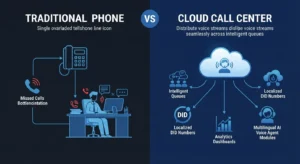
Moving from a basic phone setup to a cloud call center isn’t simply about replacing one phone number with another. It’s about replacing several limitations with systems designed for higher call volumes:
-
A single phone line $\rightarrow$ Intelligent call distribution: Instead of sending every caller to one number, calls can be routed based on availability, department, language, time of day, or other rules.
-
A voicemail box $\rightarrow$ More flexible after-hours coverage: Routine questions can potentially be handled by automated systems or AI voice agents, while more complex requests can be collected for later follow-up.
-
Guesswork staffing $\rightarrow$ Call data: Call analytics can help you understand when demand is highest and where additional capacity is actually needed.
-
Hardware-bound growth $\rightarrow$ Configurable capacity: Instead of rebuilding the phone system every time the company grows, cloud infrastructure allows additional numbers, agents, and call capacity to be configured dynamically.
-
One-language coverage $\rightarrow$ Multilingual support: Language-based routing, multilingual employees, and AI voice agents can help businesses support a broader customer base.
How SIP Trunking Fits Into a Cloud Call Center
For many businesses, SIP trunking becomes part of the underlying telephony infrastructure when moving toward a cloud-based call center. To learn more about the mechanics behind this transmission layer, read our guide on SIP trunking vs. VoIP: What’s the difference and why it matters.
SIP trunking allows voice calls to be carried over an internet connection rather than relying entirely on traditional telephone infrastructure. The call center platform then handles the operational side of those calls — routing, queues, agents, recordings, analytics, automation, and other functions.
DID numbers can also be used to provide local or dedicated business numbers for different teams, services, or locations. For example, a company could have:
-
One number for sales
-
One number for customer support
-
A dedicated number for appointments
-
Separate numbers for different locations
-
Different inbound numbers for marketing campaigns
Those calls don’t necessarily need to terminate at separate physical phone systems. They can be routed through the same cloud call center according to the rules you’ve configured.
Making the Switch
Moving to a cloud call center doesn’t necessarily mean ripping out your existing phone infrastructure overnight. A gradual migration can be easier to manage. Many businesses can begin by provisioning SIP trunking and DID numbers alongside their existing setup. The new system can then be tested for call quality, routing, number configuration, and workflow requirements before the business fully migrates.
A typical transition might involve:
-
Reviewing your current call volume: Identify how many calls you receive, when they arrive, and where calls are currently being lost.
-
Mapping your call flows: Determine where calls should go based on departments, languages, business hours, and customer requirements.
-
Setting up SIP trunking and numbers: Establish the telephony connection and provision the required DID numbers.
-
Configuring the cloud call center: Set up queues, routing rules, agents, business hours, voicemail, and reporting.
-
Adding automation where appropriate: Introduce IVR or AI voice agents for routine interactions and after-hours coverage.
-
Testing before full migration: Verify inbound and outbound calls, transfers, routing, audio quality, and failover behavior.
-
Migrating fully once the system is proven: Move remaining call traffic to the new environment once the setup is working as expected.
This approach reduces the pressure of trying to change everything at once.
Does Your Business Need a Cloud Call Center?
Not every business needs a full call center. If your company receives a small number of calls, rarely misses them, has limited routing requirements, and doesn’t need detailed analytics or extended coverage, a basic phone system may still be perfectly adequate.
The issue is when the phone system starts creating operational problems. If customers regularly can’t get through, your team is overwhelmed during peak periods, you can’t see what’s happening with your calls, adding capacity requires new hardware, or customers expect support outside business hours, those are signs that your communication infrastructure may need to evolve.
And if two or more of the signs above sound familiar, it may be worth comparing your current call volume with what a cloud call center would actually require. The cost can sometimes be more manageable than expected once you account for missed calls, manual processes, unused staff time, and the infrastructure required to keep expanding a traditional setup.
Build a Call Center Around Your Business
A cloud call center should fit the way your business actually handles calls — not force your team into a fixed workflow.
SIP Egypt provides cloud call center solutions for businesses across Egypt, combining SIP trunking, local and nationwide DID numbers, call routing, and multilingual AI voice agents. Furthermore, to safeguard your new communications infrastructure against malicious attacks and toll fraud, be sure to review our best practices in SIP trunk security and how to protect your business from VoIP fraud.
Whether you’re trying to handle peak-hour call volume, support customers in multiple languages, add after-hours coverage, or simply gain better visibility into your calls, the right setup can give your business considerably more control over how every customer interaction is handled.
Tell SIP Egypt your current call volume, existing phone setup, and growth requirements, and the team can map out what moving to a cloud call center could look like for your business.